
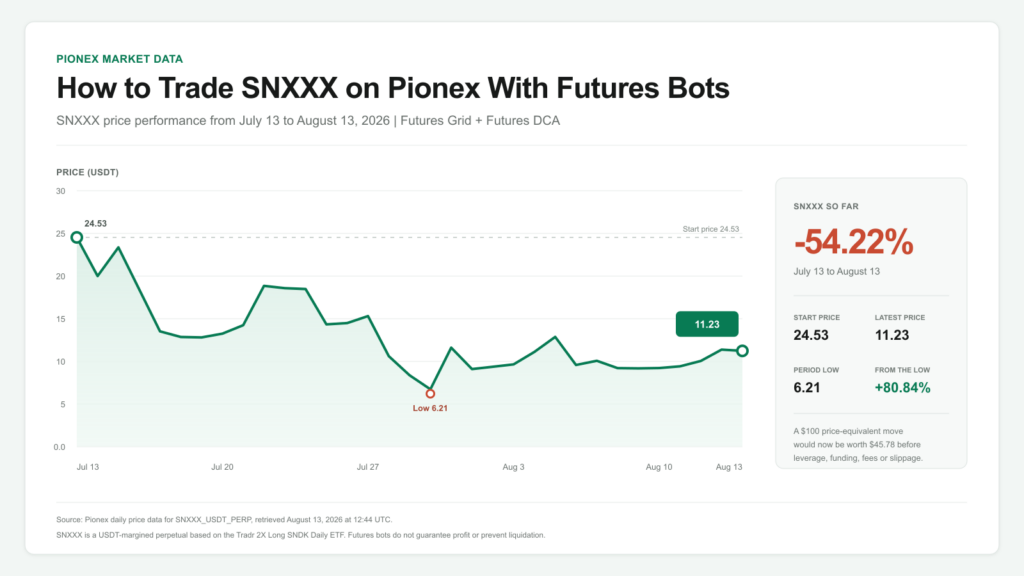
SNXXX fell 54.9% from 24.53 USDT on July 13 to 11.06 USDT at 12:17 UTC on August 13, then rebounded 78.1% from its period low. This guide shows how to trade SNXXX on Pionex manually or with Futures Grid and Futures DCA bots, how to choose a bot for the market condition, and which leverage, funding and liquidation risks to check before starting.
Contents
SNXXX Performance So Far
SNXXX is a USDT-margined perpetual futures contract on Pionex based on SNXX, the Tradr 2X Long SNDK Daily ETF. Its recent price history shows why traders should define their direction and risk limits before opening a manual position or launching a bot.
| Metric | Value |
|---|---|
| Starting price, July 13 | 24.53 USDT |
| Snapshot price, August 13 at 12:17 UTC | 11.06 USDT |
| Period high | 25.75 USDT |
| Period low | 6.21 USDT |
| Change from July 13 | -54.9% |
| Rebound from period low | +78.1% |
| Distance below period high | -57.0% |
| Hypothetical $100 following only the contract-price change | $45.09 before costs or selected leverage |
| Most recent 24-hour turnover | Approximately $2.35 million |
| Most recent 24-hour trade count | 177,275 |
Source: Pionex daily and 24-hour market data for SNXXX_USDT_PERP, retrieved August 13, 2026 at approximately 12:17 UTC. The $100 example tracks only the quoted contract-price change. It excludes futures leverage, funding, fees, slippage and liquidation.
The move is best described as a strong rebound inside a much larger drawdown. SNXXX recovered sharply from 6.21 USDT but remained 57.0% below its period high.
That combination can create opportunities for active traders, but it can also punish tight bot ranges and highly leveraged directional positions.
How to Trade SNXXX on Pionex
Step 1: Open the SNXXX Market
Sign in to Pionex and open the SNXXX/USDT perpetual trading page.
Confirm that the selected market is SNXXX/USDT, labeled USDT-M Perp, rather than SNDK stock or the SNXX ETF.
Pionex displayed leverage of up to 25x for SNXXX on August 13, 2026. Always check the current contract page because leverage limits and other specifications can change.
Step 2: Read the Live Contract Information
Before placing an order, check the live:
- Mark price
- Funding rate and next funding time
- Maximum available leverage
- Maintenance margin
- Estimated liquidation price
- Current minimum order or bot investment
Do not use the screenshot price or the article snapshot as an entry price. SNXXX trades continuously, so the figures will change.
Step 3: Choose a Direction or Bot
Your market view should determine the trading method:
| Market view | Pionex method | What it does |
|---|---|---|
| Strong move higher or lower | Manual futures | Opens a direct long or short position |
| Sideways or choppy market within a range | Futures Grid Bot | Repeatedly trades price levels inside a selected range |
| Directional view with staged entries | Futures DCA Bot | Builds a long or short futures position through repeated entries |
| Predefined external trading signals | Signal Bot | Executes a prepared signal strategy and requires advanced risk rules |
No bot guarantees profit. A bot automates the instructions you give it, including bad ranges, excessive leverage or an incorrect directional view.
Step 4: Set Leverage and Position Size
SNXXX already references SNXX, an ETF targeting 200% of SNDK’s daily return. Adding futures leverage increases the speed and size of both gains and losses.
Select leverage only after checking the estimated liquidation price. Use a position size that leaves room for normal volatility, funding and margin changes.
The maximum leverage displayed by Pionex is a platform limit, not a recommended setting.
Step 5: Add Exit Rules Before Confirming
Decide where the trade becomes invalid before creating it. If the current setup supports them, add take-profit and stop-loss conditions.
Also decide whether you will close the position before:
- A funding settlement
- A major SNDK event
- A break outside the bot’s selected range
- The position reaches your maximum acceptable loss
Review the order or bot summary, including the investment, leverage, liquidation estimate, price range and direction. Confirm the trade only when those details match your plan.
Which Pionex Bot Should You Use for SNXXX?
Futures Grid Bot: For a Defined Trading Range
The Futures Grid Bot is the clearest fit when you expect SNXXX to move repeatedly within a range instead of trending continuously in one direction.
Pionex supports three Futures Grid modes:
- Long: Designed for a range with an upward bias.
- Short: Designed for a range with a downward bias.
- Neutral: Designed for two-way movement without a strong directional bias.
To create a Futures Grid Bot in the Pionex app:
- Open Bot.
- Select Create.
- Choose Futures.
- Select Futures Grid.
- Choose SNXXX if it is available.
- Select Copy Strategy or Customize.
- Review the settings and press Create.
On the Pionex website, go to:
Futures > Futures Bot > Futures Grid
When customizing the bot, review:
- Upper and lower price boundaries
- Number of grids
- Total investment
- Selected leverage
- Long, short or neutral direction
- Take-profit settings
- Stop-loss settings
The current SNXXX price should be inside the selected grid range when the bot starts.
SNXXX’s observed range of 6.21 to 25.75 USDT was unusually wide. A narrow grid may stop trading or become exposed to a breakout quickly, while high leverage can bring liquidation closer.
Build the range using current price action, not an old screenshot or snapshot.
Futures DCA Bot: For Staged Directional Entries
The Futures DCA Bot may suit a trader who already has a long or short view but wants to enter in stages instead of opening the full position at once.
The bot can average the entry price through additional futures orders and can use a take-profit target.
However, Futures DCA is not the same as low-risk spot DCA. If SNXXX continues moving against the chosen direction, repeated entries can increase exposure and the position can still be liquidated.
The Futures DCA Bot appeared in Pionex’s live Futures Bot menu during the August 13 check. Pair availability, configuration choices and minimum investment may depend on the current app, account and contract setup.
Confirm that SNXXX is selectable before relying on this method.
Signal Bot: Only for an Existing Signal System
The Signal Bot is an advanced option for traders who already have clear entry, exit and position-sizing signals.
It is not a substitute for deciding when to go long or short. A signal strategy should be tested and should include loss limits before it controls a leveraged SNXXX position.
For most traders choosing between Pionex bots:
- Futures Grid fits a planned trading range.
- Futures DCA fits a planned directional entry.
- Signal Bot fits an existing external signal system.
Signal Bot should not be the default starting point for inexperienced traders.
Practical SNXXX Bot Checklist
Before pressing Create, confirm every item below:
| Setting | What to verify |
|---|---|
| Trading pair | SNXXX/USDT Perpetual |
| Bot type | Futures Grid or Futures DCA |
| Direction | Long, short or neutral where supported |
| Investment | Current displayed minimum and total amount at risk |
| Leverage | Estimated liquidation price remains acceptable to your plan |
| Grid range | Based on current support, resistance and volatility |
| Grid count | Enough spacing to prevent fees from overwhelming small grid profits |
| Take profit | Defined before entry where available |
| Stop loss | Defined before entry where available |
| Funding | Current rate, payment direction and next settlement time checked |
Pionex documentation cites a 10 USDT baseline for some Futures Grid setups. However, the exact amount required can vary by instrument and settings.
The exact live SNXXX bot minimum could not be confirmed during this check. Use the minimum amount displayed in the current SNXXX bot creation screen.
What SNXXX Actually Tracks
SNXXX does not directly track SanDisk shares. It is a perpetual futures contract based on SNXX, the Tradr 2X Long SNDK Daily ETF. For the underlying stock and SNDKX market narrative, read Pionex’s analysis of SanDisk’s 2026 AI storage rally.
The structure has two separate leverage layers:
- SNXX targets 200% of SNDK’s daily percentage return before fees and expenses.
- SNXXX allows a trader to choose additional futures leverage on Pionex, subject to current limits and margin rules.
This should not be described as a fixed long-term multiple of SanDisk.
SNXX resets its objective daily. Compounding, ETF tracking, futures funding, mark-price movement and liquidation can make the result very different from simply multiplying SNDK’s weekly or monthly return.
For example, suppose SNDK rises 10% one day and falls 10% the next day:
- SNDK moves from $100 to $110.
- A 10% decline then takes it from $110 to $99.
- SNDK finishes 1% below its starting value.
A simplified product delivering twice each daily move would:
- Rise 20% from $100 to $120.
- Fall 20% from $120 to $96.
- Finish 4% below its starting value.
Additional SNXXX futures leverage would amplify the position’s gain or loss further.
Three Main Risks When Trading SNXXX
1. SanDisk and Daily-Reset Risk
A decline in SNDK can be magnified by SNXX’s 2x daily objective. Volatile back-and-forth moves can also create compounding drag even when SanDisk finishes near its starting price.
2. Leverage and Liquidation Risk
Higher SNXXX leverage reduces the room available for adverse mark-price movement.
A manual trade, Futures Grid Bot or Futures DCA Bot can be liquidated if the position’s margin becomes insufficient.
3. Bot, Funding and Range Risk
Automation does not remove market risk.
A grid may perform poorly when the price escapes its range. A DCA bot may add exposure during a continued adverse move, while funding can reduce returns when the position is on the paying side.
How to Monitor an Open SNXXX Trade or Bot
Check total profit and loss, not only grid profit or completed bot orders.
Monitor:
- Mark price and distance to liquidation
- Available margin and maintenance margin
- Funding rate and next settlement time
- Whether the price remains inside the grid range
- Total position size after DCA entries
- SNDK and SNXX price action
- Take-profit and stop-loss status
If the market breaks the original plan, stopping the bot does not always mean the futures position has been closed.
Read the confirmation screen and verify whether any position or open orders remain.
Frequently Asked Questions
How Do I Trade SNXXX on Pionex?
Open the SNXXX/USDT perpetual market, review the live contract details and choose manual futures or a supported bot.
Set the direction, investment and leverage, add exit rules, and confirm the estimated liquidation price before creating the trade.
Which Pionex Bots Can Be Used for SNXXX?
Pionex’s Futures Bot menu displayed Futures Grid, Futures DCA and Signal Bot options during the August 13, 2026 check.
Confirm that SNXXX is selectable in the chosen bot’s creation screen because pair availability and requirements can change.
Is Futures Grid or Futures DCA Better for SNXXX?
Futures Grid is generally built for repeated movement inside a defined range. Futures DCA is built for staged entries based on an existing long or short view.
The better choice depends on the market condition and the trader’s risk plan. Neither bot guarantees profit.
Can I Long and Short SNXXX With a Pionex Bot?
Futures Grid supports long, short and neutral modes. Futures DCA supports directional long or short strategies.
Confirm the modes available for SNXXX in the current setup screen before creating the bot.
How Has SNXXX Performed So Far?
At approximately 12:17 UTC on August 13, 2026, SNXXX was trading at 11.06 USDT.
It was down 54.9% from 24.53 USDT on July 13, had traded between 6.21 and 25.75 USDT during the observed period and had rebounded 78.1% from the low.
What Is the Minimum Amount Needed for an SNXXX Bot?
The exact minimum varies with the current contract, bot, leverage and settings.
Pionex documentation gives a 10 USDT baseline for some Futures Grid setups, but traders should use the live minimum shown in the SNXXX bot creation screen.
What Is the Difference Between SNDK, SNXX and SNXXX?
SNDK is SanDisk common stock.
SNXX is an ETF targeting 200% of SNDK’s daily return before fees and expenses.
SNXXX is Pionex’s perpetual futures market based on SNXX, with a separate futures-leverage choice.
Can an SNXXX Trading Bot Be Liquidated?
Yes. Futures Grid, Futures DCA and signal-driven positions use futures margin.
If adverse mark-price movement causes the margin to fall below the required level, the position may be liquidated.
Is SNXXX Suitable for Long-Term Holding?
SNXX targets a daily result, not a fixed result over weeks or months.
SNXXX also adds funding and liquidation risk, so it requires active monitoring and should not be treated as a passive substitute for SNDK shares.
Want to compare SNXXX with tokenised-stock markets? Read our tokenised stocks guide.
Disclaimer
This article is for informational purposes only and does not constitute financial or investment advice.
Crypto and derivatives trading carries significant risk, including the possible loss of all capital. Past performance is not indicative of future results. Always conduct your own research before trading.
Data sources: Pionex market data for SNXXX_USDT_PERP, the official Pionex SNXXX listing, Pionex Futures Grid and Futures DCA documentation, the Pionex Funding Fee guide and official Tradr SNXX fund information.
Market snapshot retrieved August 13, 2026 at approximately 12:17 UTC.
