
Last reviewed: September 1, 2026
Pionex trading bots automate repeated trading tasks, so you can follow a strategy without placing every order manually. This guide shows you how to choose your first bot, set it up, monitor performance and stop it when your plan changes. You stay in control of the settings, capital and risk.
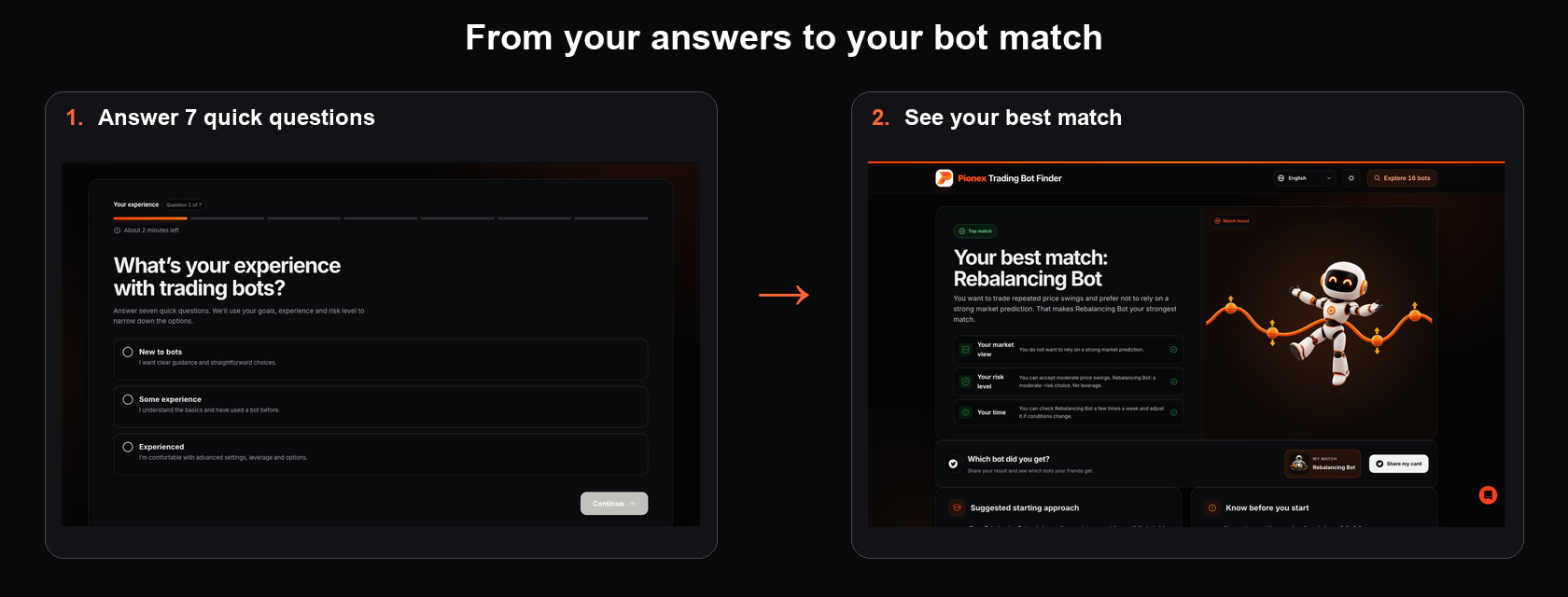
You need three decisions before you press Create:
- What market are you using? Spot bots use assets you own. Futures bots use derivatives and can involve leverage, funding payments and liquidation risk.
- What is the bot’s job? Examples include trading repeated movement inside a range, buying gradually, or keeping a portfolio near chosen percentages.
- What would make you stop? Write down the price, loss limit, time limit or market change that would invalidate your plan.
If you still need to register, complete verification or fund your account, start with the Pionex beginner guide. This guide begins at the point where you are ready to choose and run a bot.
Step 1: Choose the job before the bot
A bot name should not be your starting point. Begin with the behavior you expect and the risk you understand.
| Your goal or market view | Bot family to study | Question to answer first |
|---|---|---|
| Trade repeated price movement inside a range | Spot Grid | What range would invalidate your view? |
| Buy an asset gradually over time | DCA | How much can you commit on each schedule? |
| Keep several assets near target weights | Rebalancing | Which allocation and rebalancing method will you use? |
| Automate an entry with take-profit or stop-loss rules | Smart Trade | What is your entry, target and maximum acceptable loss? |
| Trade a range with leverage | Futures Grid | Do you understand liquidation, funding and leverage? |
These are starting points, not promises that a bot will suit current conditions. If you want a fuller comparison, use the guide to choosing a crypto trading bot strategy.
In the Pionex app, the official Spot Grid flow is Bot → Create → Spot → Spot Grid. On the web, open Spot → Trading Bot, choose Grid Trading Bot, and then select Create. The names and layout can change as the product is updated, so read the live screen before confirming anything.
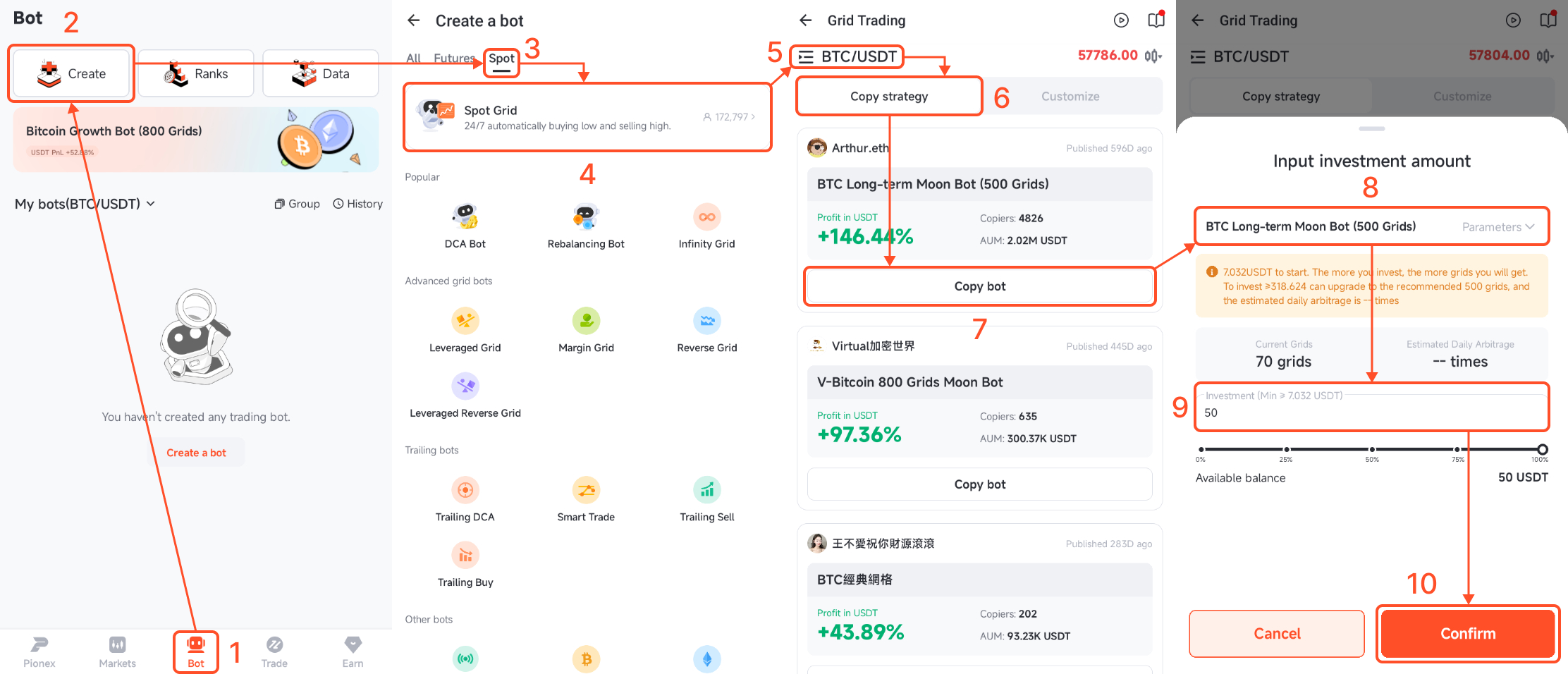
Choose the bot family first, then choose the available trading pair. Confirm that the quote asset, product type and market are the ones you intended. Similar names do not mean the same risk.
Step 3: Review the bot before you press Create
Do not treat a copied or AI-generated strategy as a one-click recommendation. It is a set of parameters based on a method or historical data. You remain responsible for deciding whether those settings fit your market view.
Review at least these items:
- Product and pair: Check Spot versus Futures and both assets in the pair.
- Strategy source: Know whether you copied a strategy, used suggested settings or entered custom parameters.
- Investment: Enter an amount that leaves room for mistakes and does not expose money you need for essential expenses.
- Operating rules: For a Grid Bot, inspect the lower price, upper price and number of grids. Other bots have different core settings.
- Risk controls: Review any trigger price, stop-loss, take-profit, slippage control or leverage setting shown.
- Order summary: Read the final confirmation, including how much capital will be used.
There is no single minimum that applies to every bot and pair. The valid amount can change with the selected pair, price range, number of grids and order requirements. Use the current value displayed in the order panel.
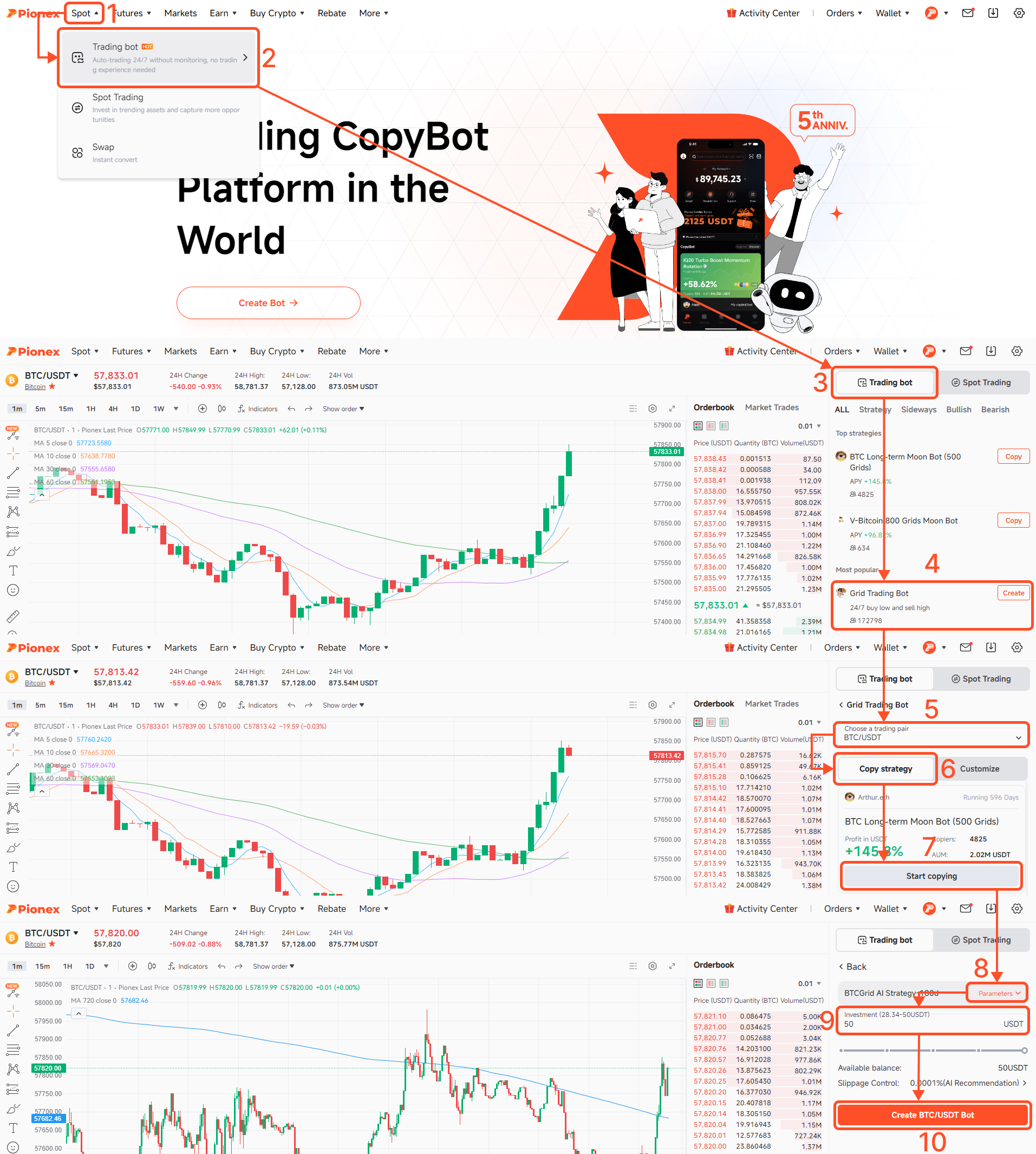
A first Spot Grid walkthrough
Spot Grid is a useful example because its rules are visible, but it is not automatically the best first bot for every person or market.
- Select Spot Grid and an available pair.
- Choose whether to study a copied strategy or customize the settings.
- Review the lower and upper prices. This is the range where normal grid trading operates.
- Review the grid count. More grids create smaller intervals and typically smaller amounts per completed grid cycle.
- Enter the investment and read the estimated order information shown.
- Add risk controls when they fit your plan, then read the confirmation before you create the bot.
If price moves above or below the selected range, normal grid activity pauses and can resume if price returns. Below the lower limit, a Spot Grid can leave you mainly or fully exposed to the base asset, whose value may continue to fall. For a detailed parameter explanation, read the Grid Bot setup guide.
What happens after you press Create?
Pionex allocates the specified funds to the strategy and the bot begins placing or managing orders according to its rules. What happens next depends on the bot. A Grid Bot manages orders across price levels, while a DCA Bot follows its purchasing schedule or conditions.
You do not need to keep the app open for the bot to continue running on Pionex. You do need to check it. Automation removes repeated manual order entry, not your responsibility for risk and exit decisions.
How to monitor a running bot
Do not judge a bot using one green number. Check the complete position and the market condition that justified starting it.
- Total profit and loss: This is more useful than looking at completed grid cycles alone.
- Grid profit or realized activity: This shows what the bot earned from completed cycles, but it does not include the full change in the value of assets still held.
- Unrealized profit and loss: This reflects the changing value of the open position.
- Price versus the operating range: Check whether the bot is trading normally, paused outside its range or approaching a risk limit.
- Open orders and holdings: Confirm what the bot currently owns and what orders remain active.
- Fees, funding and liquidation information: Fees affect every product. Futures bots can also involve funding and liquidation risk.
A Grid Bot can show positive grid profit while total profit and loss is negative. That can happen when completed buy-low, sell-high cycles earned money but the market value of the remaining asset fell by more.
How to stop a Pionex bot
Open the running bot, choose its stop or close control, and read the confirmation screen carefully. Before confirming, check how the remaining assets will be handled, whether open orders will be cancelled, and whether the screen offers a choice to retain or convert assets. Available choices can differ by bot and product, and execution prices can change with the market.
Stopping should follow the exit condition you wrote before starting. It should not depend only on fear after a short-term move or hope after your original plan has failed.
When you should not start a bot
- You cannot explain what the bot does in one or two sentences.
- You do not know whether you selected Spot or Futures.
- You are using borrowed money or funds needed for living expenses.
- You copied settings without checking the pair, range, investment and risk controls.
- You want to use leverage but do not understand liquidation and funding.
- You have no condition for stopping.
First-bot checklist
- I know the bot’s job and the market condition it needs.
- I checked the product, pair and assets.
- I understand the key settings rather than relying on a copied label.
- I am using an amount I can afford to lose.
- I reviewed stop-loss, take-profit and leverage settings where applicable.
- I wrote down what would make me stop.
- I will monitor total profit and loss, not only grid profit.
Frequently asked questions
How do I start a Pionex trading bot?
Choose a bot based on the job you want it to perform, select the product and pair, review or enter the parameters, set your investment, inspect the risk controls and order summary, then confirm Create.
Do Pionex bots trade automatically?
Yes. After you create a bot, Pionex places and manages orders according to the rules you selected. The bot does not predict the market or guarantee a positive result.
Which Pionex bot should I use first?
Start with a bot whose behavior and risk you can explain. The Pionex Trading Bot Finder can help you compare bot families, but the final choice depends on your market view, goal and risk tolerance.
How much money do I need to start a Pionex bot?
There is no single minimum for every bot and pair. The required amount can change with the pair, price, range, grid count and order rules. Use the current minimum displayed in the order panel.
Can I lose money with a Pionex bot?
Yes. Bots do not remove market, asset, execution, fee, range or leverage risk. Use an amount you can afford to lose and understand the product before you start.
What happens if price leaves a Grid Bot range?
Normal grid activity pauses outside the upper or lower limit and can resume if price returns, unless another closing condition stops the bot. Your asset exposure and market risk remain.
Why can grid profit be positive while total profit and loss is negative?
Completed grid cycles may earn a profit while the market value of assets still held falls by a larger amount. Check total profit and loss, unrealized profit and loss, and current holdings together.
How do I monitor a Pionex bot?
Check total profit and loss, realized or grid profit, unrealized profit and loss, price versus the operating range, open orders, holdings, fees and your planned exit conditions.
How do I stop a Pionex bot?
Open the running bot, choose its stop or close control, and review the confirmation. Check how remaining assets and open orders will be handled before you confirm.
Do I need to keep the Pionex app open?
No. A created bot runs on Pionex according to its settings, but you should still monitor its performance, risk controls and exit conditions.
This content is for educational purposes only and does not constitute financial advice. Cryptocurrency trading involves risk, including possible loss of principal. Past performance and historical strategy data do not guarantee future results.
